nith for agencies
Make the site.
Run the
client work.
Turn a client brief into a website with Jot, refine the details in Studio, and keep prospects, client sites and agency admin together.
Tell us about your agency and the clients you want to build for.
Follow a client through nith.
An illustrated workflow, from the first conversation to the next project.
 Illustrated agency workflow
A good site starts with a good brief.
Keep the businesses you are talking to in one place, with contacts, notes and progress. Review their existing website and brand before you start building.
Prospect records · website audits · brand reports
See the prospects panel ↗1 of 3 · Reduced motion
Your agency,
at a glance.
Check traffic, enquiries and site health across the sites you manage. See where your attention is needed, then open the client’s workspace.
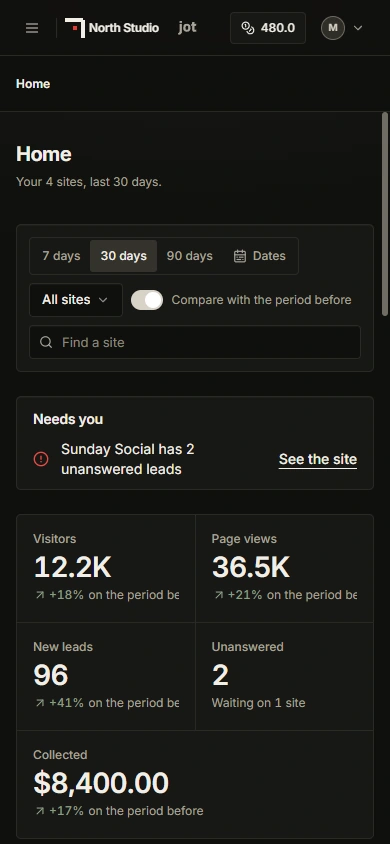
See the portfolio. Compare traffic across client sites and spot enquiries waiting for a reply.
Stay close to each client. Open their site to work on content, design and settings.
Keep the work connected. See client invoice totals alongside site health and plan status.
Before the
first page.
Track the businesses you are talking to, from a new lead to a won project. Keep their contacts, notes, website audits and brand reports with the prospect.
Use the reviewed brand information to create a site, then let Jot help with the draft. You stay in charge of the direction and the finished result.
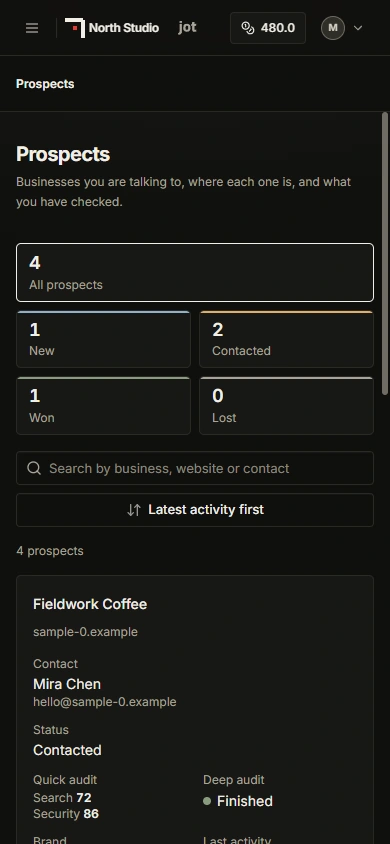
After the launch.
Keep managing the site, bring your team into the work, or hand it to the owner. The agency tools stay close to the websites you build.
Build for them.
Work with them.
Invite people with the access they need. When a client takes ownership through handoff, your agency’s access is removed unless they grant it again.
Try the editing tools ↗Contracts and signatures
Start with a template or upload a PDF, place signature fields, and send an agreement to a prospect or client. Sending can use credits.
Client invoices
Send one-time invoices or offer recurring plans for your own work. Connect a ready Stripe account to receive payments. Platform and Stripe fees apply; review the current terms in the workspace.
Team access
Bring people into your agency and control which sites and tools they can use through roles, groups and site access.
Shared assets
Keep agency images in a shared library for the sites you manage, so useful assets are easy to find again.
Agency branding
Add your agency details, support channels and links. White-label is a separate, eligibility-dependent add-on; check current availability in Billing.